远程服务站
USB Redirector Technician Edition
使用教程
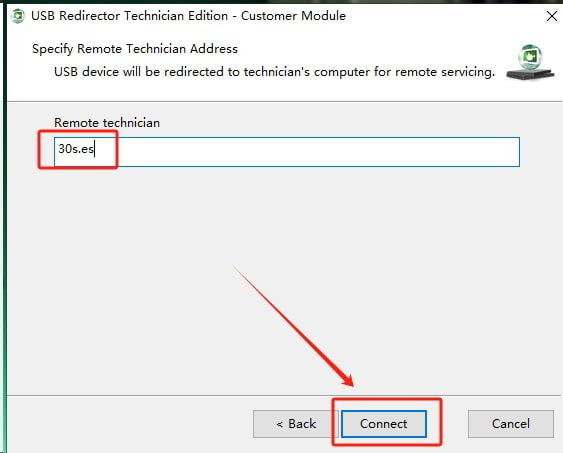
运行 USB 1.97,稍等几秒后输入 30s.es,点击 Connect。软件跳到步骤 1,所有之后连接的 USB 设备会被识别。
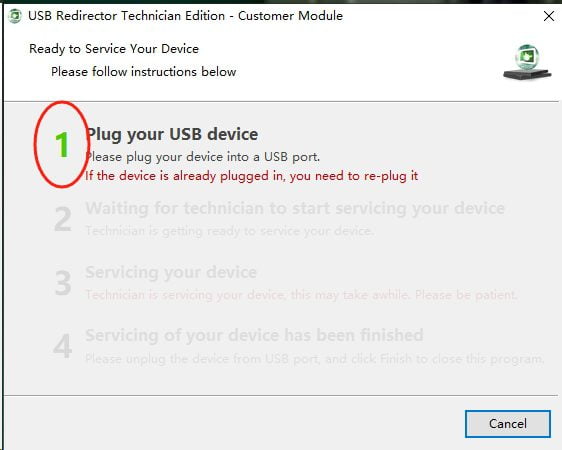
软件成功连接到服务器后,将手机用数据线插到电脑。软件会自动跳 2。如果没有跳,请检查数据线、手机尾插或电脑 USB 口。
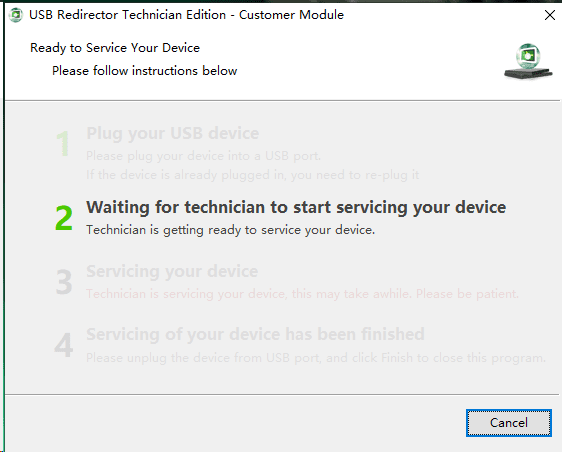
软件跳到步骤 2 表示已成功识别手机并连到服务器。
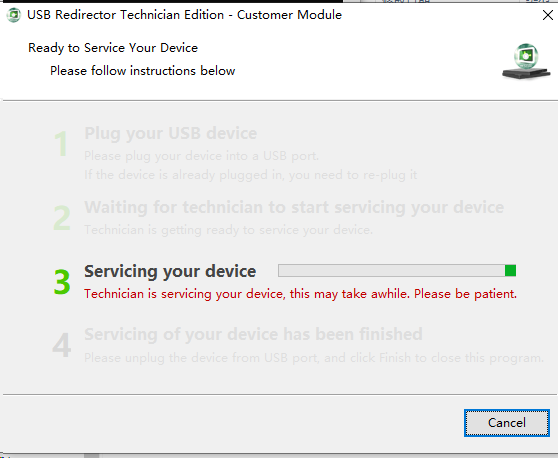
等候回复即可。
服务范围
- ✅ 各品牌手机谷歌锁 FRP
- ✅ 三星账户锁
- ❌ 企业锁、网络锁、欠费锁、丢失锁 — 暂不支持
注意事项
请确认手机已恢复出厂设置、电量充足。使用质量好的数据线(建议原装),确保解锁过程中不会断电。解完谷歌锁后如仍有企业锁/网络锁导致无法正常使用,不予退款。
Centro de Servicio Remoto
USB Redirector Technician Edition
Tutorial de uso
Ejecute USB 1.97, espere unos segundos e ingrese 30s.es, haga clic en Connect. El software saltará al paso 1 y todos los dispositivos USB conectados serán reconocidos.
Después de conectarse al servidor, conecte su teléfono a la computadora con un cable USB. El software saltará automáticamente al paso 2. Si no salta, verifique el cable, el puerto USB o el conector del teléfono.
Cuando el software muestre el paso 2, significa que el teléfono ha sido reconocido y conectado al servidor correctamente.
Solo espere la respuesta del equipo.
Servicios
- ✅ Desbloqueo FRP (Google Lock) para todas las marcas
- ✅ Desbloqueo de cuenta Samsung
- ❌ Bloqueo empresarial, bloqueo de red, bloqueo por impago, bloqueo por pérdida — No disponible
Aviso importante
Asegúrese de que el teléfono esté restablecido de fábrica y tenga suficiente batería. Use un cable de buena calidad (preferiblemente original). No se reembolsará si después de desbloquear el FRP el teléfono aún tiene bloqueo empresarial o de red que impida su uso normal.
Remote Service Center
USB Redirector Technician Edition
User Guide
Run USB 1.97, wait a few seconds, enter 30s.es, and click Connect. The software will jump to step 1, and all connected USB devices will be recognized.
After successfully connecting to the server, connect your phone to the computer via USB cable. The software will automatically jump to step 2. If it doesn't, check the cable, phone port, or computer USB port.
When the software reaches step 2, it means the phone has been recognized and connected to the server successfully.
Wait for a reply from our team.
Services
- ✅ FRP (Google Lock) unlock — all brands
- ✅ Samsung account lock removal
- ❌ Enterprise lock, network lock, carrier lock, lost lock — Not available
Important Notice
Make sure your phone has been factory reset and has sufficient battery. Use a good quality cable (preferably original). No refund will be issued if the phone still has an enterprise or network lock preventing normal use after FRP unlock.